DHCP server 設定
SRX における DHCP 設定はデフォルトコンフィグにも含まれているため、見たことがある方が多いかもしれません。
Legacy DHCP と呼ばれる Junos 15系、17系などの古い資料では書式が異なる場合があるため、注意してください。
Starting with Junos OS Release 15.1X49-D60 and Junos OS Release 17.3R1, the legacy DHCPD (DHCP daemon) configuration on all SRX Series Firewalls is being deprecated. and only the new JDHCP CLI is supported.
現行は JDHCP daemon が DHCP 機能を提供しており、SRX300 のデフォルトコンフィグでいえば以下の部分です。
set system services dhcp-local-server group jdhcp-group interface irb.0
set security zones security-zone trust host-inbound-traffic system-services all
set security zones security-zone trust interfaces irb.0
set interfaces irb unit 0 family inet address 192.168.1.1/24
set access address-assignment pool junosDHCPPool family inet network 192.168.1.0/24
set access address-assignment pool junosDHCPPool family inet range junosRange low 192.168.1.2
set access address-assignment pool junosDHCPPool family inet range junosRange high 192.168.1.254
set access address-assignment pool junosDHCPPool family inet dhcp-attributes router 192.168.1.1
set access address-assignment pool junosDHCPPool family inet dhcp-attributes propagate-settings ge-0/0/0.0
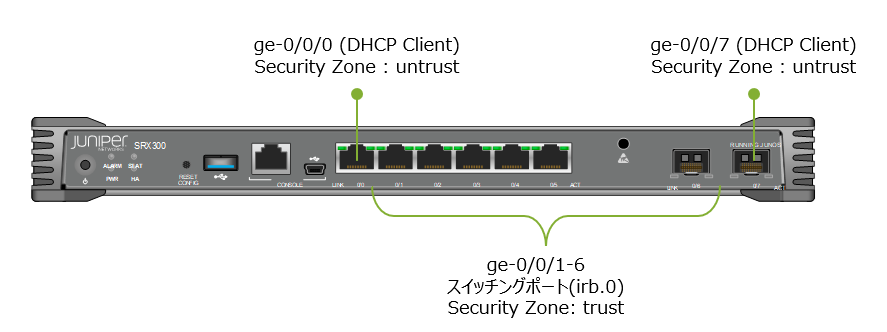
SRX300 の場合、デフォルト設定では ge-0/0/0, ge-0/0/7 が DHCP クライアントとして設定されており、ge-0/0/1-6 がスイッチングポートとなっています。これらのスイッチングポートでは irb.0 が 192.168.1.1/24 のアドレスを持っており、DHCP サーバーとして動作します。
説明
DHCP の設定コマンドは次の2つが必要です。
jdhcp-group というグループを作成し、DHCP ローカルサーバーをインターフェースで有効化します。
グループ名は好きな名前で問題ありません。
set system services dhcp-local-server group jdhcp-group interface irb.0
割り当てるアドレス範囲やオプション設定を指定します。
set access address-assignment pool junosDHCPPool family inet network 192.168.1.0/24
set access address-assignment pool junosDHCPPool family inet range junosRange low 192.168.1.2
set access address-assignment pool junosDHCPPool family inet range junosRange high 192.168.1.254
set access address-assignment pool junosDHCPPool family inet dhcp-attributes router 192.168.1.1
set access address-assignment pool junosDHCPPool family inet dhcp-attributes propagate-settings ge-0/0/0.0
propagate-settings はアップリンクなどが DHCP クライアントで設定されている場合に、上位の DHCP サーバーから受信した設定を pool に継承します。
そのほかよく使うものとしては、DNS サーバー、ドメインネーム、リースタイムなどがあります。
set access address-assignment pool junosDHCPPool family inet dhcp-attributes name-server 8.8.8.8
set access address-assignment pool junosDHCPPool family inet dhcp-attributes domain-name example.com
set access address-assignment pool junosDHCPPool family inet dhcp-attributes maximum-lease-time 86400
また、関連する設定として、SRX の場合セキュリティゾーンで DHCP サービスの受信を許可する必要があります。ここでは irb.0 インターフェースが trust ゾーンのため all で許可されています。必要に応じて dhcp, ping などに限定しましょう。
set security zones security-zone trust host-inbound-traffic system-services all
set security zones security-zone trust interfaces irb.0
DHCP 予約
クライアントの MAC アドレスに応じて IP アドレスを予約しておきたい場合、以下のような設定を行います。
set access address-assignment pool junosDHCPPool family inet host client hardware-address f8:1a:2b:c0:ff:ee ip-address 192.168.1.50
DHCP ステータスの確認
リース情報の表示
> show dhcp server binding
IP address        Session Id  Hardware address   Expires     State      Interface
192.168.1.18      5920        12:26:aa:aa:bb:cc  49620       BOUND      irb.0
192.168.1.16      5918        1c:83:41:bb:cc:aa  78629       BOUND      irb.0
192.168.1.20      5922        24:41:8c:cc:aa:bb  77311       BOUND      irb.0
リース情報の詳細
> show dhcp server binding detail

Client IP Address:  172.17.17.18
     Hardware Address:             12:26:aa:aa:bb:cc
     State:                        BOUND(LOCAL_SERVER_STATE_BOUND)
     Protocol-Used:                DHCP
     Lease Expires:                2024-08-16 23:59:27 UTC
     Lease Expires in:             47435 seconds
     Lease Start:                  2024-08-15 23:59:26 UTC
     Last Packet Received:         2024-08-15 23:59:27 UTC
     Incoming Client Interface:    irb.0:ge-0/0/1.0
     Server Identifier:            192.168.1.1
     Session Id:                   5920
     Client Pool Name:             junosDHCPPool
統計情報の表示
> show dhcp server statistics
Packets dropped:
    Total                      2
    No binding found           2

Offer Delay:
    DELAYED                    0
    INPROGRESS                 0
    TOTAL                      0

Messages received:
    BOOTREQUEST                1100
    DHCPDECLINE                0
    DHCPDISCOVER               132
    DHCPINFORM                 20
    DHCPRELEASE                6
    DHCPREQUEST                942
    DHCPLEASEQUERY             0
    DHCPBULKLEASEQUERY         0
    DHCPACTIVELEASEQUERY       0

Messages sent:
    BOOTREPLY                  566
    DHCPOFFER                  82
    DHCPACK                    458
    DHCPNAK                    26
    DHCPFORCERENEW             0
    DHCPLEASEUNASSIGNED        0
    DHCPLEASEUNKNOWN           0
    DHCPLEASEACTIVE            0
    DHCPLEASEQUERYDONE         0
TraceOption
デバッグの際は次のようなトレースオプションを利用します。
set system processes dhcp-service traceoptions file dhcp_log
set system processes dhcp-service traceoptions file size 10m
set system processes dhcp-service traceoptions flag all
set system processes dhcp-service traceoptions level all
参考資料
DHCP Server Configuration
https://www.juniper.net/documentation/us/en/software/junos/dhcp/topics/topic-map/dhcp-server-configuration.html
Legacy DHCP and Extended DHCP
https://www.juniper.net/documentation/us/en/software/junos/dhcp/topics/topic-map/dhcp-legacy-and-extended.html
Configuring Static Address Assignments
https://www.juniper.net/documentation/en_US/junos/topics/topic-map/dhcp-address-asignment-pools-security-devices.html#id-configuring-static-address-assignments