PPPoE 設定
図のような環境で SRX を用いて PPPoE 接続を行い、Trust Zone からインターネットにアクセスする設定。
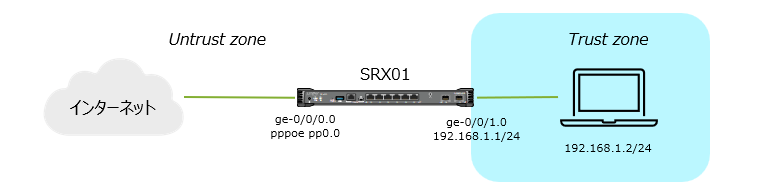
| 項目 | サンプル設定値 |
|---|---|
| 認証プロトコル | chap |
| 認証ユーザー名 | juniper123@isp.example.net |
| パスワード | Juniper!1 |
| WAN 側インターフェース | ge-0/0/0.0 |
接続に使用するインターフェースに PPPoE カプセル化を指定
set interfaces ge-0/0/0 unit 0 encapsulation ppp-over-ether
ISP から提供される認証情報を設定
set interfaces pp0 unit 0 ppp-options chap default-chap-secret "Juniper!1"
set interfaces pp0 unit 0 ppp-options chap local-name "juniper123@isp.example.net"
set interfaces pp0 unit 0 ppp-options chap passive
PPPoE オプションの設定
set interfaces pp0 unit 0 pppoe-options underlying-interface ge-0/0/0.0
set interfaces pp0 unit 0 pppoe-options auto-reconnect 10
set interfaces pp0 unit 0 pppoe-options client
IP 設定 (ISP から付与される IP を使用する場合)
set interfaces pp0 unit 0 family inet negotiate-address
フレッツ向け MTU 設定
set interfaces pp0 unit 0 family inet mtu 1454
TCP MSS 設定(オプション)
set security flow tcp-mss all-tcp mss 1414
デフォルトルート設定
set routing-options static route 0.0.0.0/0 next-hop pp0.0
pp0 インターフェースのセキュリティゾーン設定
set security zone security-zone Untrust interfaces pp0
pppoe の設定はここまでですが、クライアントが通信するために Source NAT とセキュリティポリシー設定などが必要です。
Untrust 側インターフェースのゾーン設定
set security zones security-zone Untrust interfaces ge-0/0/0.0
Trust 側インターフェースのゾーン、IP アドレス設定
set security zones security-zone Trust interfaces ge-0/0/1.0
set interfaces ge-0/0/1 unit 0 family inet address 192.168.1.1/24
Source NAT ルール作成
set security nat source rule-set trust-to-untrust from zone Trust
set security nat source rule-set trust-to-untrust to zone Untrust
set security nat source rule-set trust-to-untrust rule 1 match source-address 0.0.0.0/0
set security nat source rule-set trust-to-untrust rule 1 then source-nat interface
セキュリティポリシー
set security policies from-zone Trust to-zone Untrust policy trust-to-untrust match source-address any
set security policies from-zone Trust to-zone Untrust policy trust-to-untrust match destination-address any
set security policies from-zone Trust to-zone Untrust policy trust-to-untrust match application any
set security policies from-zone Trust to-zone Untrust policy trust-to-untrust then permit
PPPoE 接続の確認
セッション状態の表示
> show pppoe interfaces brief
Interface       Underlying            State       Session    Remote
                interface                         ID         MAC
pp0.0           ge-0/0/0.0            Session up  31601      00:00:5e:00:53:23
セッション詳細の表示
> show pppoe interfaces detail
pp0.0 Index 77
  State: Session up, Session ID: 31601,
  Service name: None,
  Session AC name: BAS, Configured AC name: None,
  Remote MAC address: 00:00:5e:00:53:23,
  Session uptime: 1w6d 20:30 ago,
  Auto-reconnect timeout: 10 seconds, Idle timeout: Never,
  Underlying interface: ge-0/0/0.0 Index 76
  Ignore End-of-List tag: Disable
  PPP-Max-Payload tag: 1492
pp0 インターフェース詳細の表示
> show interfaces pp0
Physical interface: pp0, Enabled, Physical link is Up
  Interface index: 129, SNMP ifIndex: 501
  Type: PPPoE, Link-level type: PPPoE, MTU: 1532
  Device flags   : Present Running
  Interface flags: Point-To-Point SNMP-Traps
  Link type      : Full-Duplex
  Link flags     : None
  Input rate     : 2312 bps (5 pps)
  Output rate    : 53720 bps (5 pps)

  Logical interface pp0.0 (Index 77) (SNMP ifIndex 538)
    Flags: Up Point-To-Point SNMP-Traps 0x0 Encapsulation: PPPoE
    PPPoE:
      State: SessionUp, Session ID: 31601,
      Session AC name: BAS, Remote MAC address: 00:00:5e:00:53:23,
      Configured AC name: None, Service name: None,
      Auto-reconnect timeout: 10 seconds, Idle timeout: Never,
      Underlying interface: ge-0/0/0.0 (Index 76)
      Ignore End-Of-List tag: Disable
      PPP-Max-Payload tag: 1492
    Input packets : 4924380
    Output packets: 5158844
  Keepalive settings: Interval 10 seconds, Up-count 1, Down-count 3
  Keepalive: Input: 19937 (00:00:13 ago), Output: 119721 (00:00:01 ago)
  LCP state: Opened
  NCP state: inet: Opened, inet6: Not-configured, iso: Not-configured, mpls: Not-configured
  CHAP state: Success
  PAP state: Closed
    Security: Zone: external-1
    Allowed host-inbound traffic : ike ping
    Protocol inet, MTU: 1454
    Max nh cache: 0, New hold nh limit: 0, Curr nh cnt: 0, Curr new hold cnt: 0, NH drop cnt: 0
      Flags: Sendbcast-pkt-to-re, User-MTU, Negotiate-Address
      Addresses, Flags: Kernel Is-Preferred Is-Primary
        Destination: 192.0.2.1, Local: 192.0.2.75